
Demo: a teacher asks Ada for a three-question exit slip on factoring quadratics, built from her Thursday lesson. Ada confirms the details, makes it with an answer key, and saves it to the Algebra II folder.
Just tell Ada what you need. She builds it for any math or science classroom.
Talk to Ada like you would a colleague. She asks a few quick questions, then makes standards-aligned lessons, slides, reviews, warm-ups, exit slips, and homework, with answer keys for everything, and files them in the right folder.
No credit card. Use your voice or just type.
Prefer to type a topic?
Free to start. See sample lessons
New: Turn any lesson into a review, game, or project in one click: scavenger hunt, escape room, math maze, bingo, and more.
What teachers are saying
“Your AI engine is far superior to Gemini, Claude, and [ChatGPT]…”
“Being able to make every aspect of the outputs fit my learners is a game changer!”
“I have saved so much time with this site, it is brilliant.”
“I LOVE this site. I've been sharing it with many of my colleagues.”
Featured teacher lessons
Made by teachers, rated among our best
Free to use from the Community Library.
See it in 35 seconds
Teachers & AI, by the numbers
6 weeks
of time saved per school year by teachers who use AI weekly
Up to 84%
of teachers using AI say it saves them time, depending on the task
64%
of teachers using AI say AI-adapted materials are higher quality
Source: Gallup & Walton Family Foundation, 2025 survey of 2,232 U.S. public K-12 teachers. Figures describe AI tools in general.
Everything a Math & Science Teacher Needs, In One Place
Build materials for any course, any level, from foundational to AP/Honors. Tag every lesson with CCSS, NGSS, or your own standard codes.
Full Lesson Plans
Scaffolded, student-centered lessons with launch hooks, pacing, teacher scripts, and answer keys, structured around your framework and fitted to your exact class period.
Presentation-Ready Slides
Turn any lesson into a themed classroom deck with one click. Built-in countdown timer, random student grouper, and export to PowerPoint. Everything you need to walk in and teach.
Quick Create
Describe what you need in one line and get a print-ready warm-up, exit ticket, worksheet, or graphic organizer in seconds, already shaped to your grade and standards.
Assessments & Parallel Forms
Build quizzes and tests with multiple equivalent versions to prevent answer-sharing. Adjust rigor instantly, tag, bank, and reuse.
Review & Study Guides
Assemble end-of-unit study guides and test-review packets from your own lessons and questions, with learning targets, worked examples, vocabulary, and a practice set plus answer key.
Project-Based Units
Generate full PBL units with a driving question, student brief, milestones, a rubric, and a teacher facilitation guide, ready to run start to finish.
Quick Assignments
Homework sets, bell ringers, exit tickets, spiral reviews, fluency practice, and Do Nows, ready in minutes for any topic.
Multilingual Handouts
Translate any student handout into your class languages while keeping the math, diagrams, and layout intact, so multilingual learners get the same rigorous task.
Question Bank
Every question you create is automatically saved, tagged, and searchable. Build your personal item library over time.
Reteach from Results
Taught it and the class struggled? Describe how they did and build a targeted reteach or next-day warm-up: a focused follow-up lesson shaped by what actually happened in your room.
It Gets to Know You, So Every Output Already Fits
STEMEngine remembers your teaching profile and factors it into everything it builds. No prompt engineering, no repeating yourself. Your lessons, quick creates, reviews, and assessments arrive already shaped to your classroom.
Your grade and standards
Set the courses you teach and the standards you align to once. Every lesson, quick create, and assessment is tagged and built to match, no re-entering it each time.
Your class period and pacing
Tell us how long your class runs and everything you generate is fitted to that block, with pacing that actually lands in the time you have.
Your pedagogy and preferences
Pick your framework and teaching preferences and they carry into every output automatically. You can still override anything on any single lesson.
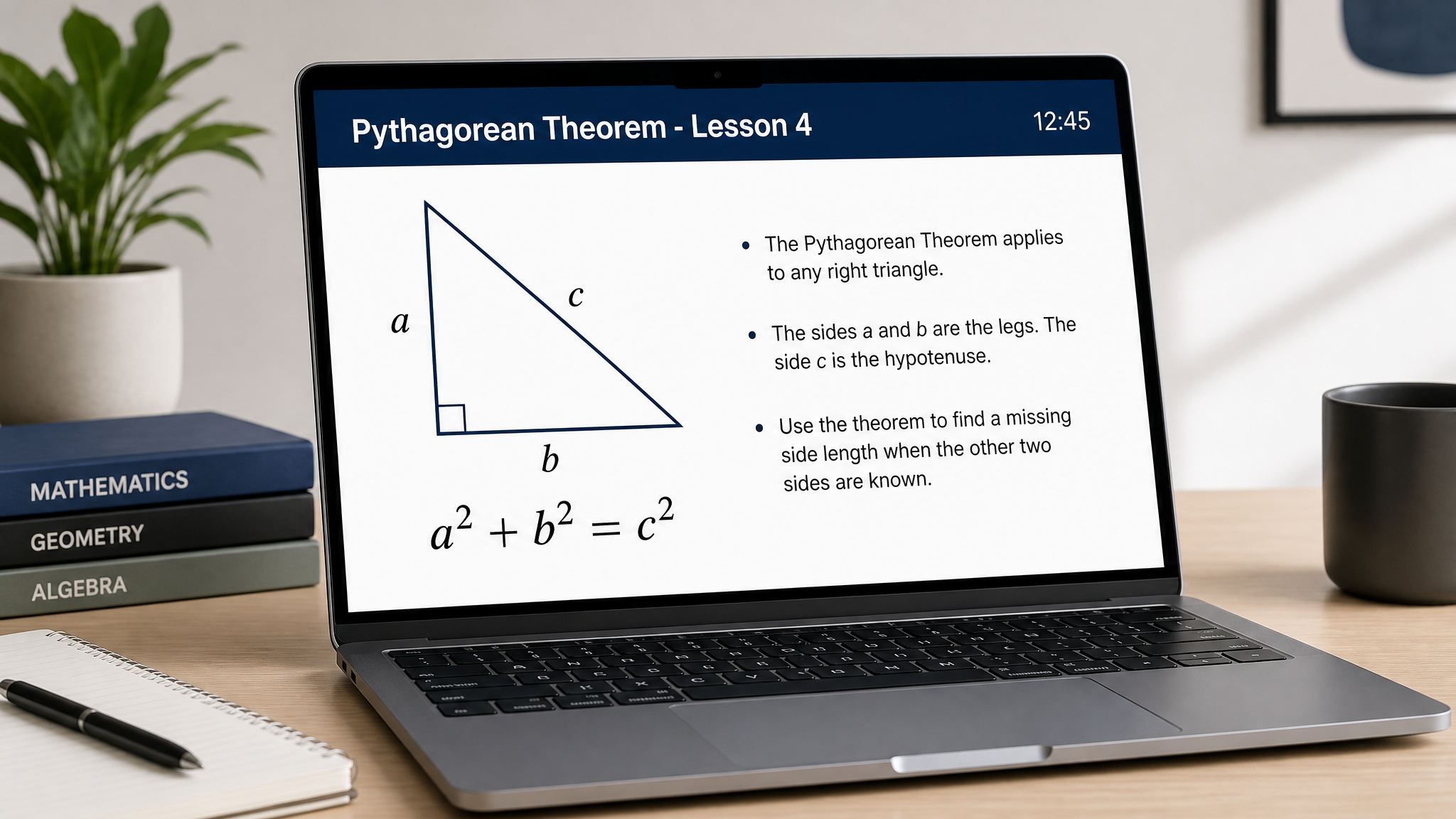
Turn any lesson into a classroom-ready slide deck
One click transforms your full lesson, warm-up through exit slip, into a presentation you can teach from. No copy-pasting into PowerPoint. No reformatting. Just walk in and present.
5 classroom themes
Classic, Focus, High Contrast, Readable, Early Learners, each with three décor levels.
Built-in countdown timer
Set per-task time limits visible on every slide. Pause, reset, or let it count down live.
Random student grouper
Paste your roster and group students on the spot: pairs, trios, or custom sizes.
Export to PowerPoint
Download the whole deck as a .pptx file, editable in PowerPoint or Google Slides.
Algebra 1 — Full Course
Grade 8 · 84 topics · from your pacing guide
Plan entire units — or your whole course
Stop building lessons one at a time with no bigger picture. Upload your district's pacing guide or scope-and-sequence and the Course Planner maps every topic for you. Then build each lesson straight from the plan — your whole course stays organized in one place with progress you can see at a glance.
Start from your curriculum
Upload your pacing guide, syllabus, or scope-and-sequence (PDF, photo, or pasted text) and every topic is mapped for you — up to 120 topics per course.
Or plan your own sequence
Pick a subject and grade and let AI suggest a topic sequence, or type your own. Edit, reorder, add, or remove topics until it matches your scope.
Build every lesson
Generate each lesson directly from the plan. Every lesson auto-files into the unit folder with the right topic and standards.
Track your progress
See which lessons are built and which are still planned. Pick up right where you left off.
Three Steps to Your Ready-to-Teach Lesson
Set Your Vision
No prompt crafting, no AI expertise. Just pick your topic, grade level, class length, and framework. The engine already knows how to turn those choices into a structured lesson.
Your Lesson Takes Shape
In minutes, your choices become a fully structured lesson plan, assessment with parallel forms, or targeted assignment, complete with answer keys.
Make It Yours
Swap problems, adjust difficulty, differentiate for your learners, then print or share with your team.
See it in action
You bring the expertise. The engine does the heavy lifting.
Watch a real workflow: from your idea to a full, student-centered STEM lesson you control start to finish.
Start from anything
Snap a photo of a worksheet, paste a passage, or type a quick idea. STEMEngine reads it, pinpoints the topic, grade and subject, and drafts a new lesson designed specifically for your framework, ready for you to review and refine.
A full lesson in minutes
Set grade, subject and topic, then watch a complete, classroom-ready lesson take shape in seconds, from warm-up to mastery. The 5-, 10- and 12-minute labels are your in-class pacing, timed to fit your period, not your wait time.
Math that comes alive
Every lesson can include accurate, auto-built graphs and diagrams, ready for the board or the page, with one-click handoff to Desmos. No copy-paste.
Not quite right? Just ask.
Every diagram is editable in plain language. Type a refinement and it redraws precisely, no design tools required.
Answer keys & print-ready
Flip on answer keys, then print clean student handouts or assign digitally. The full lesson is ready to teach in one click.
What You Get in Every Lesson
Not a generic worksheet. A complete, print-ready lesson plan with every section a real classroom needs.
Warm-Up
A low-floor opener that gets every student thinking from the bell. Choose prerequisite priming, spiral review of an earlier topic, or a mix of both.
Scaffolded Task Progression
A sequence of tasks that build from accessible to rigorous, each one slightly beyond the last. Tasks connect to the manipulatives your students already use: number lines, fraction bars, base-ten blocks, and more.
Exit Slip
A quick formative check that tells you in 3 minutes whether the lesson landed.
Homework
Practice sets at the difficulty you choose: free response, multiple choice, or error analysis.
Full Answer Key
Worked solutions for every task, warm-up, exit slip, and homework problem. Toggle on or off with one click.
Plus, every lesson comes with access to:
Diagrams Your Students Can Actually Read
Every image below was created on the first try from a simple topic prompt, no editing, no re-rolls. Accurate, labeled, and ready for your handout or slide deck.
Not just worksheets — the full teaching packet
Every lesson lands as a printable set: student sheets across grades and subjects, plus a teacher copy with the launch script, consolidation prompts, and full answer key. Print the stack and walk into class ready.
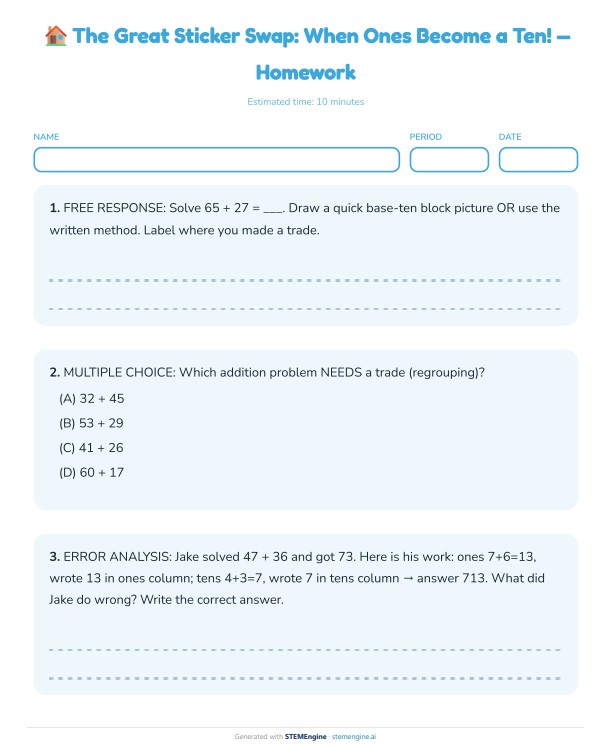
The Great Sticker Swap
Grade 2 · Math
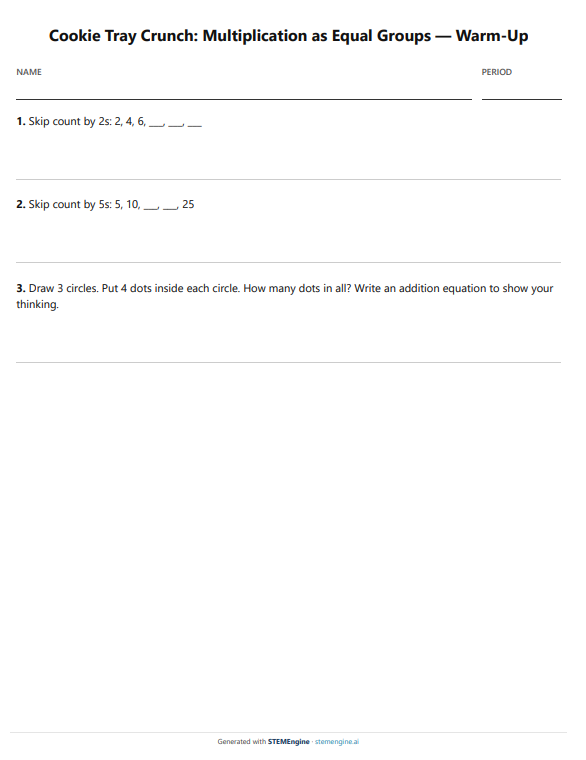
Cookie Tray Crunch
Grade 3 · Math
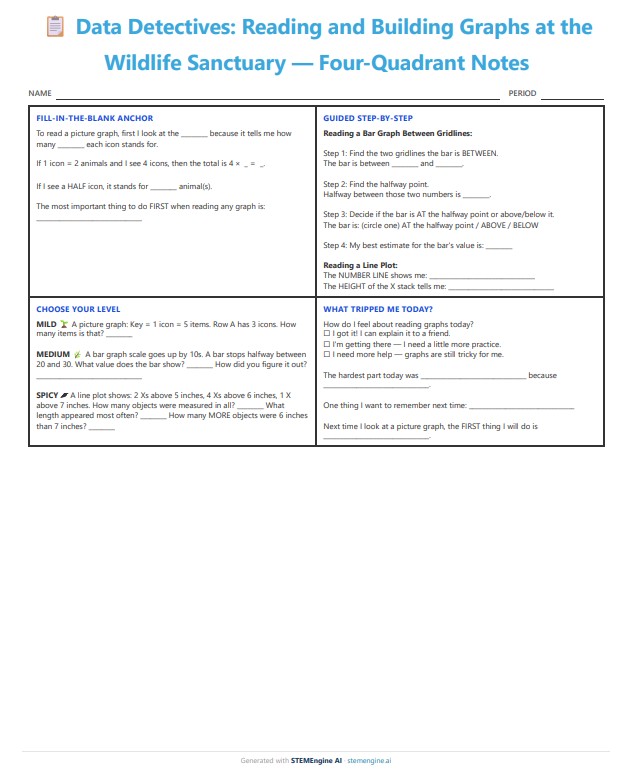
Data Detectives: Four-Quadrant Notes
Grade 3 · Math · Consolidation
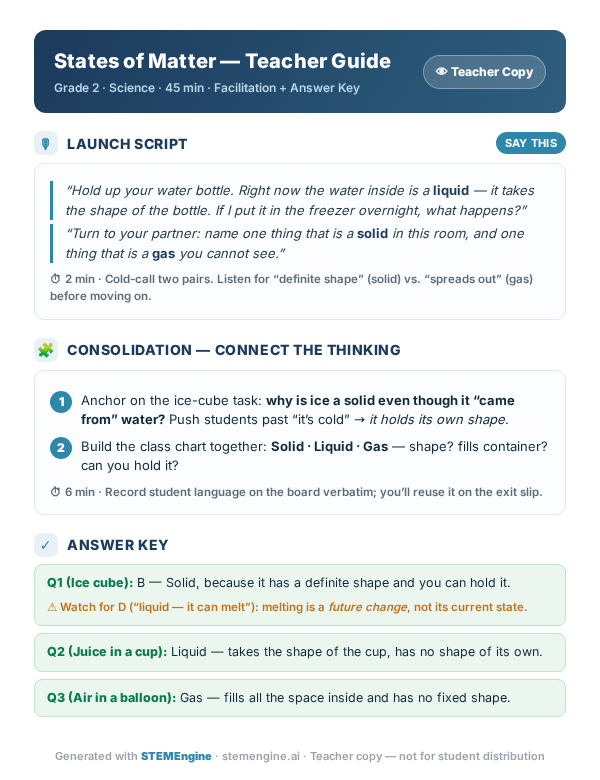
States of Matter: Teacher Guide
Grade 2 · Science · Teacher copy
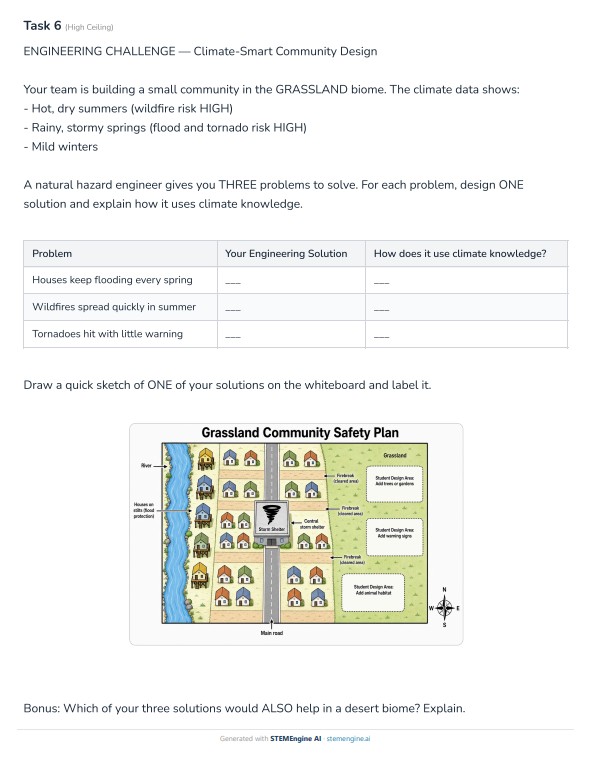
Climate-Smart Community
Grade 3 · Earth Science
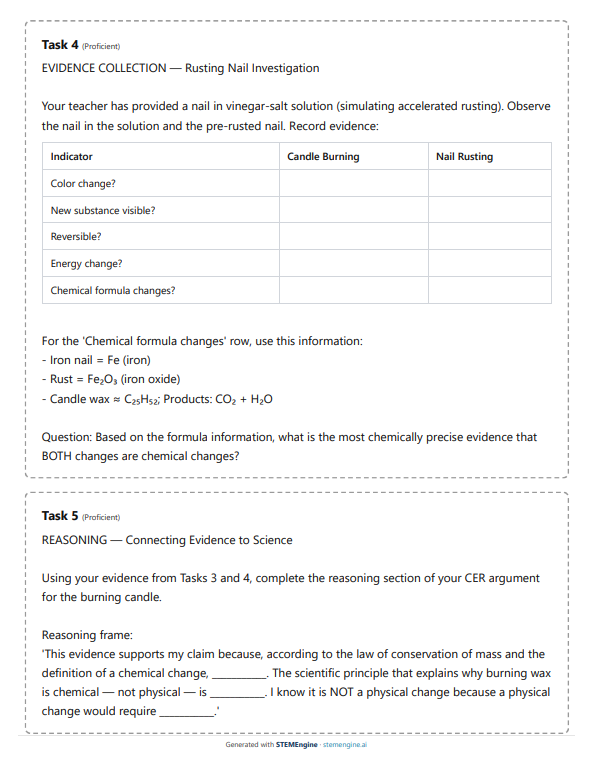
Burn or Rust?
High School · Chemistry
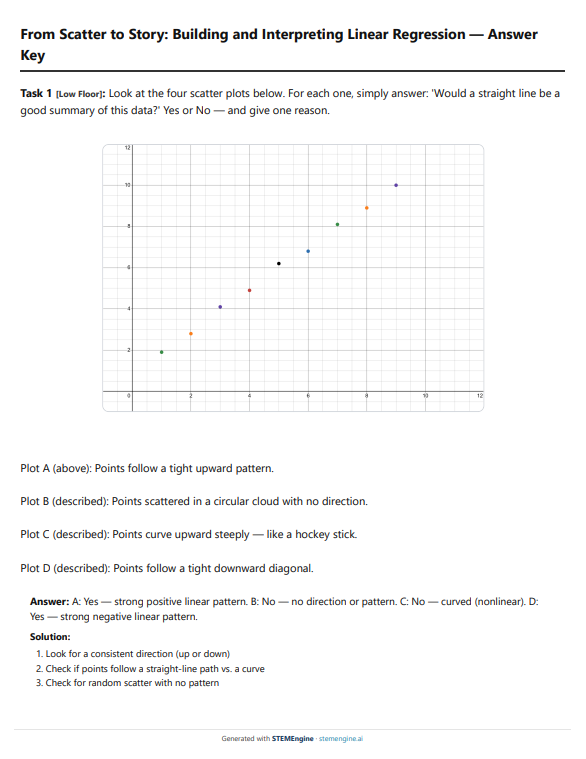
From Scatter to Story
High School · Statistics · Answer key
The teacher copy is what completes the whole package. Alongside the student materials, you get verbatim launch lines, timing cues, consolidation prompts that connect student thinking, and an answer key with the misconceptions to watch for — everything you need to take the lesson from the page to your classroom.
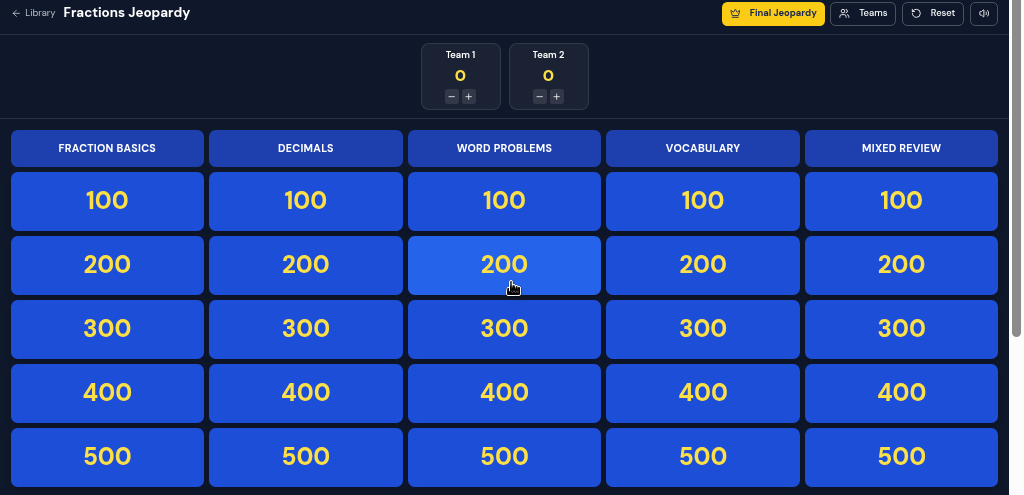
Turn any topic into a classroom game
Review day just got easier. Spin up an interactive Jeopardy board for your smart board, or print a game pack for every student, all generated from the exact topic you are teaching.
Interactive Jeopardy board
A live 5×5 grid with Daily Doubles, editable teams and scoreboard, and a Final Jeopardy round with secret wagers. Projects on your smart board.
7 printable game packs
Crossword, word search, matching, bingo, math maze, escape room, and scavenger hunt, each with a teacher answer key.
Built from your materials
Instantly generate a game from topics, lessons, units, reviews, and assessments you've already made. No prep, no templates.
Scavenger hunt
Tape 6–16 loop cards around the room. Students solve, find the matching answer, and keep moving. The loop checks itself.
Differentiate every lesson in one pass
You built the lesson for the whole class. Now build a parallel support track for the students who need it, without rewriting a thing yourself. Same concepts, same objective, a gentler on-ramp.
Review the whole lesson
Open one panel that lists every task, warm-up, exit-slip, and homework problem: the entire lesson in front of you at once.
Get smart suggestions
Each problem is read for its type and pre-matched to a support strategy: chunking, sentence starters, vocabulary banks, worked examples, friendlier numbers, plus dedicated multilingual (English-learner) and IEP accommodation supports.
Generate in one click
Apply supports across the lesson in a single pass. A scaffolded support version is added next to every original. The math stays the same.
One panel reads every problem, matches a support strategy, and generates a scaffolded version for each, in a single pass.
Same problem · two versions, side by side
A recipe uses 3/4 cup of sugar for every 2 cups of flour. If a baker uses 9 cups of flour, how much sugar is needed?
A recipe uses 3/4 cup of sugar for every 2 cups of flour. A baker uses 9 cups of flour.
- How many “batches” of 2 cups are in 9 cups of flour?
- Each batch needs 3/4 cup of sugar. Multiply your answer by 3/4.
- Write the total cups of sugar: __________
Toggle between the Class Copy and the Support Copy right in the lesson, and print either one.
Built for Math & Science, Not Generic AI
General-purpose AI tools weren't built for math and science classrooms. Here's what you get with a purpose-built engine.
| Feature | STEMEngine AI | General Purpose AI | Doing It By Hand |
|---|
⚡Core Capabilities
| AI-Powered Lesson Generation | |||
| Quiz & Assessment Creation | |||
| Multiple Question Types (MC, Free Response, etc.) | |||
| Standards Alignment (CCSS, NGSS, State & Custom Codes) | |||
| Plan & Build Entire Units (Multi-Lesson Sequences) |
📐Math & Science Rendering
| Clean Math Notation: No Raw Markdown or Broken Symbols | |||
| Print-Ready Geometry & Coordinate Graphics | |||
| Accurate Graphs Built In, One-Click to Desmos | |||
| AI-Generated Science Diagrams (Cells, Circuits, Geology) | |||
| Automated Process Flow Diagrams (Food Chains, Respiration, Cycles) | |||
| Step-by-Step Worked Solutions with Proper Math Notation |
Already using ChatGPT for lesson planning?
Paste your ChatGPT lesson, upload an old PDF, or snap a photo of a worksheet. STEMEngine turns it into a classroom-ready lesson with rendered math, auto-generated diagrams, built-in differentiation, and a printable answer key.
Paste
Copy a lesson from ChatGPT, Google Docs, or anywhere and paste it in.
Upload a PDF
Drop in an old worksheet or textbook page and let STEMEngine extract it.
Snap a photo
Take a picture of a physical worksheet or notes with your phone.
Free to try. No credit card required.
Frequently Asked Questions
Everything teachers ask before getting started.
Explore our research-informed teaching framework guides →Yes, creating an account is free, and you can build STEM lessons and browse the entire public lesson library at no cost. Upgrading simply removes the limits: you get much higher creation limits, one-click printable and PDF exports of student handouts and answer keys, plus time-saving tools like photo import (turn a worksheet photo into an editable lesson) and ready-made assessment banks. Most teachers upgrade once they’re using STEMEngine for their weekly planning and want everything print-ready without caps.
A thin-sliced lesson breaks a concept into a sequence of small, gradually escalating tasks so students build understanding step by step, from initial exploration through to mastery. It’s ideal for Building Thinking Classrooms and inquiry-based teaching.
Yes, and not just to a single standard set. Lessons can be aligned to Common Core Math, NGSS, state-specific standards, TEKS, IB, and essentially any framework you teach to. Each lesson displays its target standard code alongside the pedagogical approach, and you can specify whichever standards your district or country uses so the alignment matches your context.
STEMEngine AI covers Mathematics and Science, including algebra, geometry, calculus, statistics, biology, chemistry, physics, and earth science, from elementary through high school and introductory college.
Absolutely. You can differentiate an entire lesson in one pass, generating scaffolded support versions (chunked steps, sentence starters, vocabulary support, worked examples, cloze, reduced computation) alongside the original, then print both as ready-to-hand-out class and small-group copies.
STEMEngine isn’t limited to a fixed menu: it can structure a lesson around virtually any research-based pedagogy you name, including hundreds of frameworks and instructional models. Popular built-in options include Thin-Slicing, Building Thinking Classrooms (BTC), the 5E Model, POGIL, NGSS Phenomenon-Based learning, Claim-Evidence-Reasoning (CER), Problem-Based Learning, and Discovery/Inquiry. But if you teach with a different approach, just ask for it and the lesson’s structure, consolidation, and teacher notes adapt accordingly.
Yes. Alongside full lessons, the Quick Assign tool builds ready-to-run classroom routines in seconds — a five-day Spiral Review of mixed, cumulative skills, a Number Talks string for mental-math discussion, and the 3 Reads protocol for math word problems. Each comes with discussion prompts and answer keys, and can be projected on-screen or printed for students.
Yes. The Course Planner lets you upload your district's pacing guide, syllabus, or scope-and-sequence as a PDF, photo, or pasted text. It maps every topic automatically — up to 120 per course — and you can build each lesson straight from that plan. Your district's sequence stays intact; the AI just builds the materials to match it.
Absolutely, you’re in full control. Every task, warm-up, exit slip, and homework problem is fully editable. Swap in your own problems, insert custom tasks, adjust difficulty, or regenerate a single item, without rebuilding the whole lesson.
You can print student handouts (with or without answer keys), export to PDF, or share a live student link. Quick Assignments can also be shared as interactive links students complete on any device.
Give Your Math & Science Team the Tools They Deserve
Team & site licenses start at 5 seats. One annual invoice, priority support, and a shared resource library for your team, department, school, or district. Individual Pro plans are also available for teachers who want to get started on their own.
For Schools & Districts: try free for 30 days
Give your whole department or building full access for 30 days. No purchase order required up front. Let your teachers decide before you buy.
No student data ever reaches our servers. Students never log in.
STEMEngine processes zero student PII and is built to keep it that way. Read our privacy commitment
Built with teachers. Tell us what to build next.
Every message is read personally by the founder.